Review Comments (0) Screenshots (11) Questions & Answers (0) Votes (3) Awards (6) Wiki  
(3)
Masters ITC
3.15
www.masterslabs.com
Shareware
$30.00  Purchase
75 people
Download BlindScanner...

Downloaded 188 times

 
Video tutorial for BlindScanner Standard 2.1
Frame

Review

This review applies to version 2.9 The latest version of this software will soon be reviewed by our informers.

Have you ever faced the situation of having to scan a document, and the scanner of your office is connected to another computer? You have to distract your colleague to ask him/her to scan the document for you.
Or at home, do you need to connect a scanner to each computer? Blind Scanner is the solution. You can scan your local network connection with a scanner connected to one computer.
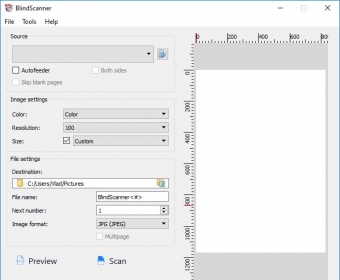
With this light application, you can connect to the scanner server. The application will share the scanner in your local network connection, so everyone connected to it will be able to scan any document or photo and save it on each computer's hard disk in a wide range of formats available with resolutions from 75 to 4800 ppi.
You can scan multiple page documents and save them to a PDF or tiff file. The application also supports scanners with Automatic Document Feeders (ADF) and works with any flatbed TWAIN scanner.
With the auto feeder option, you can scan multiple page documents without being there to wait for the process. Also, you can set the program to scan both sides and ignore the blank pages.
The program allows you to save your own presets with all your configurations to use them in your everyday work without having to configure it all again.
Blind Scanner uses a 8900 port to connect to the server. Be sure that no other program runs on this port, and that it is not blocked by firewalls.
The interface is very simple and easy to understand, because it is well designed by blocks, according to the specific tasks, such as connections, presets, multi page scan, formats, resolutions and destination.
  • Easy-to-use software, goes wireless with your laptop, scans from anywhere in your local network connection with one scanner connected to a computer that runs as a server.
  • The contents on the Help Menu never showed up, and there is no help available on the webpage.

Reviewed by: Eduardo Trejo

Reviewer rating:

Reviewed: 5 months ago

What's new in version 2.8

The updated version solves compatibility problems occurred with the BlindScanner Pro version, has changes in the About box to display the name of the license owner, as well as fix problem of the profile loading.

What's new in version 2.1

- Fixed error 5 Access Denied. Interaction between services and applications through pipes
- Default port for service was not set bug fixed
- Ability to change connection port
- Server: Service dispatcher's interface and ability for switching between app/service modes
- Server: Interface for available scanners management
- Changes in activation procedure
- Executable files signed with digital signature Microsoft Authenticode
Report a wrong version Report a wrong program title Suggest a correction

Screenshots

Version Version Select the resolution Select the resolution Select the format you need Select the format you need Server version Server version
All 11 screenshots

Latest comments


There are no comments, be the first one!
Add new comment

E-mail Address:

Password:

Register now »

Forgot password?

Sign in with:
Download Software Informer Client
Copyright © 2012, Informer Technologies, Inc. About| Privacy and terms| Help| Feedback & Support| Partners program